📘 Shop Kit guide

What each feature does, how to use it, and which plan has it.

← Shop Kit — plans & prices

How your page looks on each plan

Free free
Sample shop page on the Free plan

Call, WhatsApp, directions and reviews — with ads on the page.

Basic ₹499 / year
Sample shop page on the Basic plan

+ "Open now", an offer, photo gallery, price list, member badge, no ads.

Pro ₹999 / year
Sample shop page on the Pro plan

+ Featured spot, products with WhatsApp ordering, booking form, own web address.

A sample shop, not a real business. Scroll inside each phone to see the whole page.

🏪 Your listing, calls & reviews

Included in: Every plan, including Free

Every business gets a page with Call, WhatsApp, Directions and Share buttons, a map, and customer reviews. Owners can edit the details any time.

How to use

  1. Add your business free (or claim your existing listing).
  2. We check and approve it, usually within a day.
  3. In your dashboard, use "Get more reviews": send the review link on WhatsApp or print the QR poster for your counter.

💡 Ask real customers only. Reviews are checked before they show.
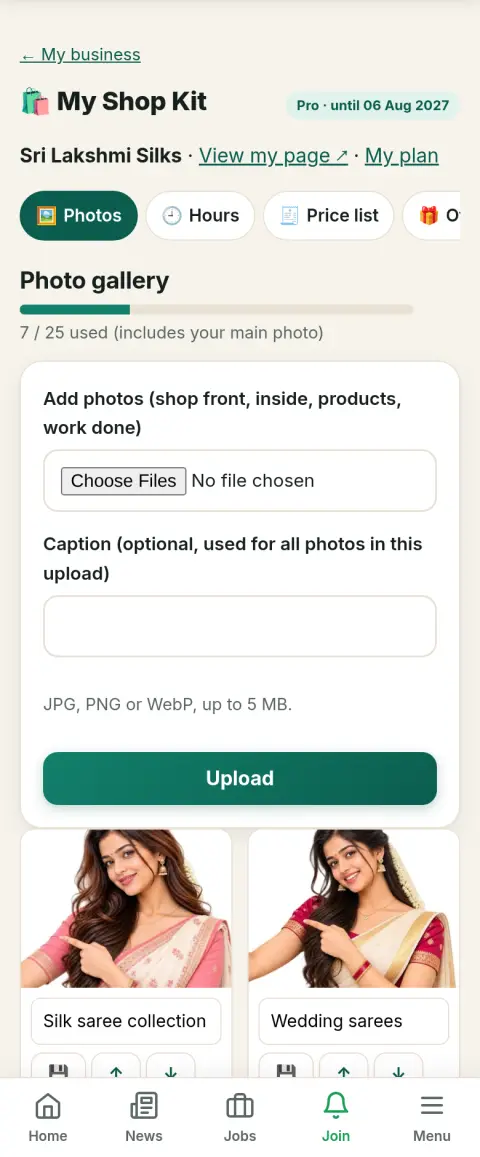
🖼️ Photo gallery

Included in: Free (1) · Basic (10) · Pro (25)

Show your shop front, inside, products and work done. Photos appear as a gallery on your page and help Google show your business.

How to use

  1. Open Shop Kit tools → Photos.
  2. Choose one or more photos (JPG, PNG or WebP) and add a short caption.
  3. Use ↑ ↓ to put the best photo first; 🗑 removes one.

💡 Bright daylight photos taken in landscape work best. The plan's count includes your main photo.

Photo gallery — screen in Shop Kit tools (sample shop)

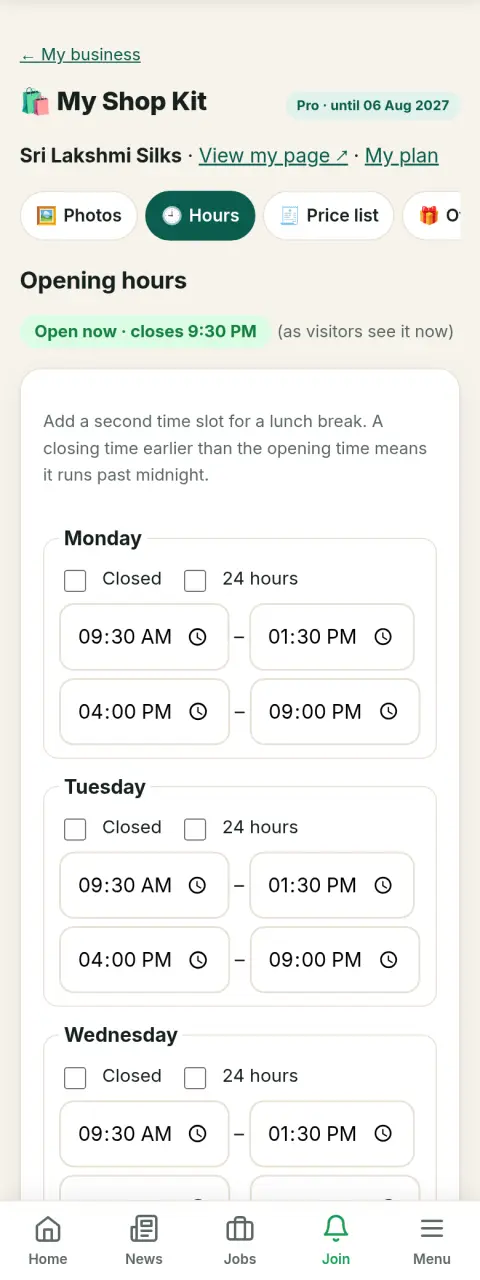
🕘 Opening hours & "Open now"

Included in: Basic · Pro

Set your hours for each day, with a lunch break if you have one. Visitors see a green "Open now · closes 9 PM" or red "Closed · opens 9 AM" on your page and in lists. Google gets the hours too.

How to use

  1. Shop Kit tools → Hours.
  2. Fill Monday, then tap "Copy Monday to all days" and fix the days that differ. Tick "Closed" or "24 hours" where needed.
  3. Closing for a festival? Add a holiday notice with an end date — it disappears by itself.

💡 Keep hours correct — a customer who finds you closed won't trust the page again.

Opening hours & "Open now" — screen in Shop Kit tools (sample shop)

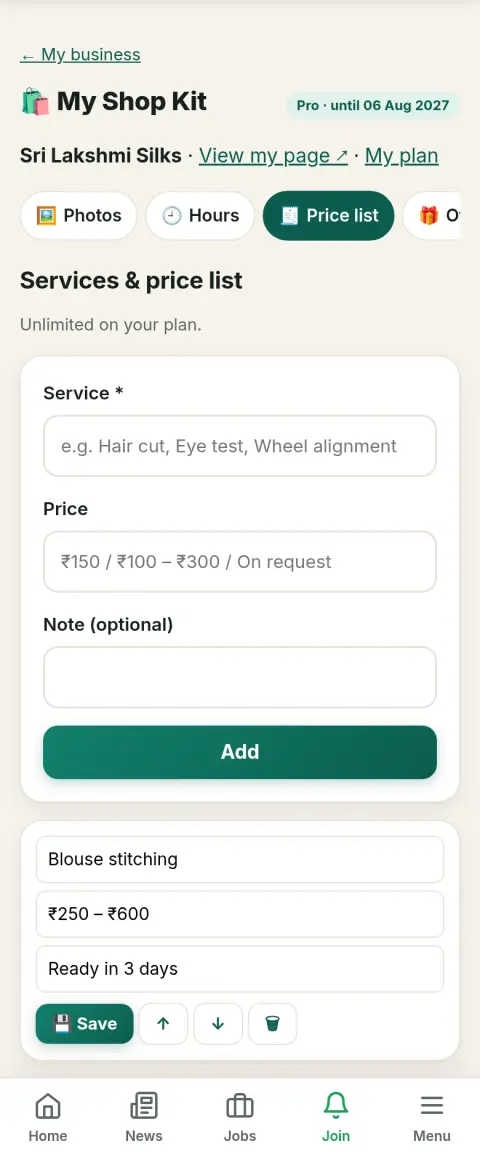
🧾 Services & price list

Included in: Basic (15) · Pro (unlimited)

A clear list of what you offer and what it costs, e.g. "Blouse stitching ₹250 – ₹600". Customers call already knowing your prices.

How to use

  1. Shop Kit tools → Price list.
  2. Add the service, the price (a range or "On request" is fine) and an optional note.
  3. Edit a row and tap 💾 Save; reorder with ↑ ↓.

💡 Put your most asked-for services at the top.

Services & price list — screen in Shop Kit tools (sample shop)

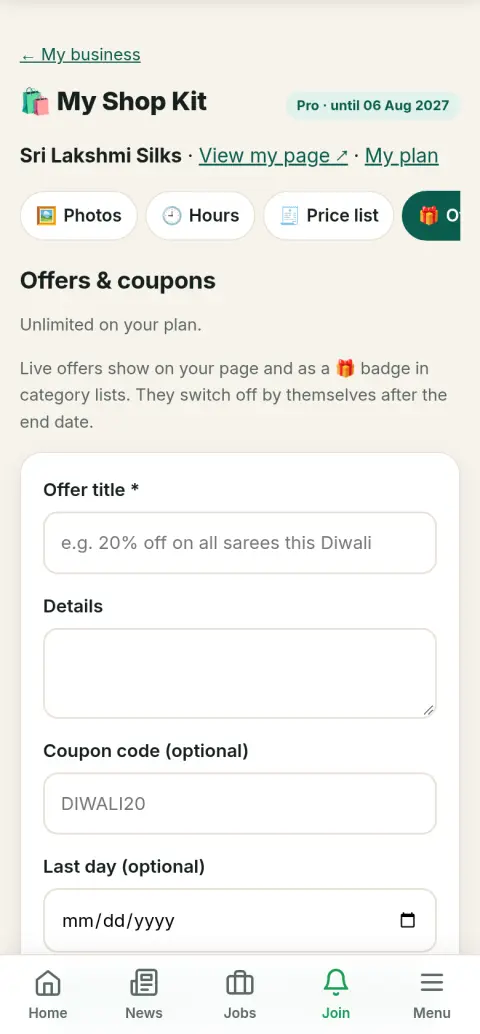
🎁 Offers & coupons

Included in: Basic (1) · Pro (unlimited)

Publish a deal with an optional coupon code and last day. It shows as a coupon box on your page and a 🎁 Offer badge in category lists, and switches off by itself after the last day.

How to use

  1. Shop Kit tools → Offers → write the title, details, code and last day.
  2. Tap "Share on WhatsApp", "Send to customers" or "Make poster" to spread it.
  3. Switch an offer off any time; switch it on again later.

💡 A clear number works best: "15% off" or "Buy 2, get 1 free".

Offers & coupons — screen in Shop Kit tools (sample shop)

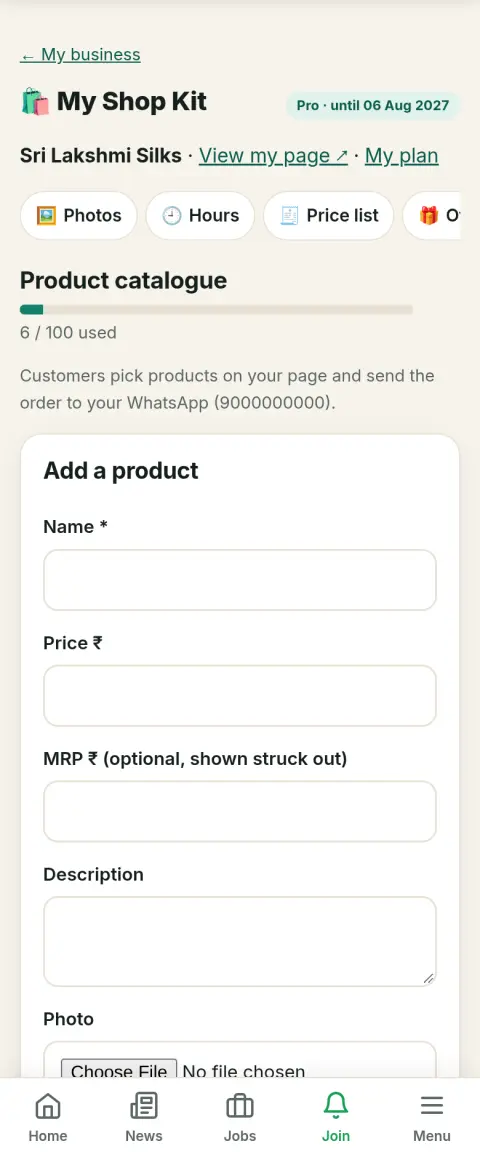
📦 Product catalogue & WhatsApp orders

Included in: Pro (100)

List products with photo, price and MRP. Customers pick quantities on your page and send one ready-made order to your WhatsApp — no app, no commission.

How to use

  1. Shop Kit tools → Products → add name, price, optional MRP, description and photo.
  2. Mark items out of stock with 📦 instead of deleting them.
  3. Orders arrive on the WhatsApp number of your listing.

💡 Square photos on a plain background look best in the grid.

Product catalogue & WhatsApp orders — screen in Shop Kit tools (sample shop)

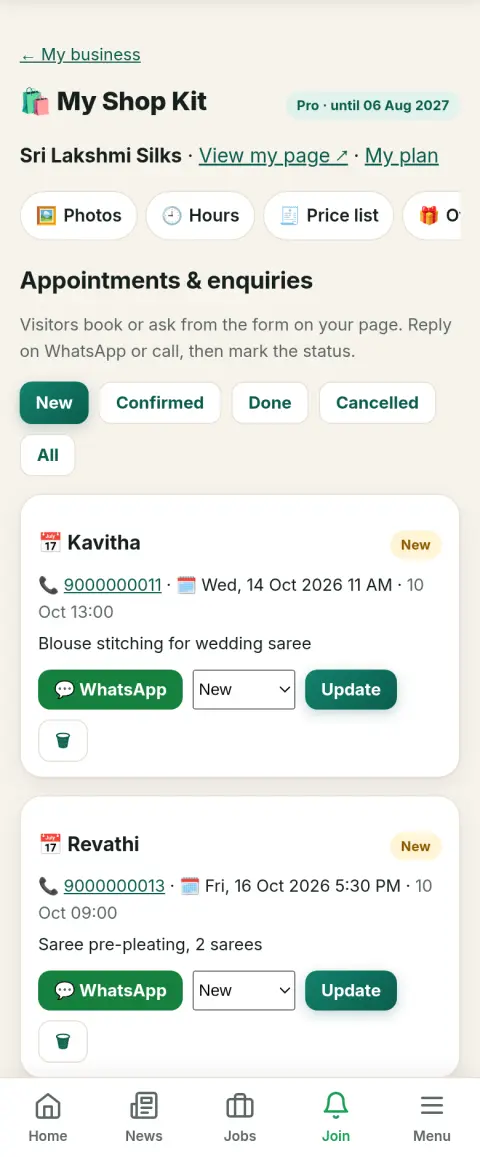
📅 Appointments & enquiries

Included in: Pro

A form on your page where visitors ask for an appointment (date and time) or send a question. You get them in one list — and by email if you gave one.

How to use

  1. New requests show as a number on your dashboard and on the Bookings tab.
  2. Reply with the 💬 WhatsApp button or call.
  3. Mark each one Confirmed, Done or Cancelled to keep the list tidy.

💡 Reply within an hour — quick replies win customers.

Appointments & enquiries — screen in Shop Kit tools (sample shop)

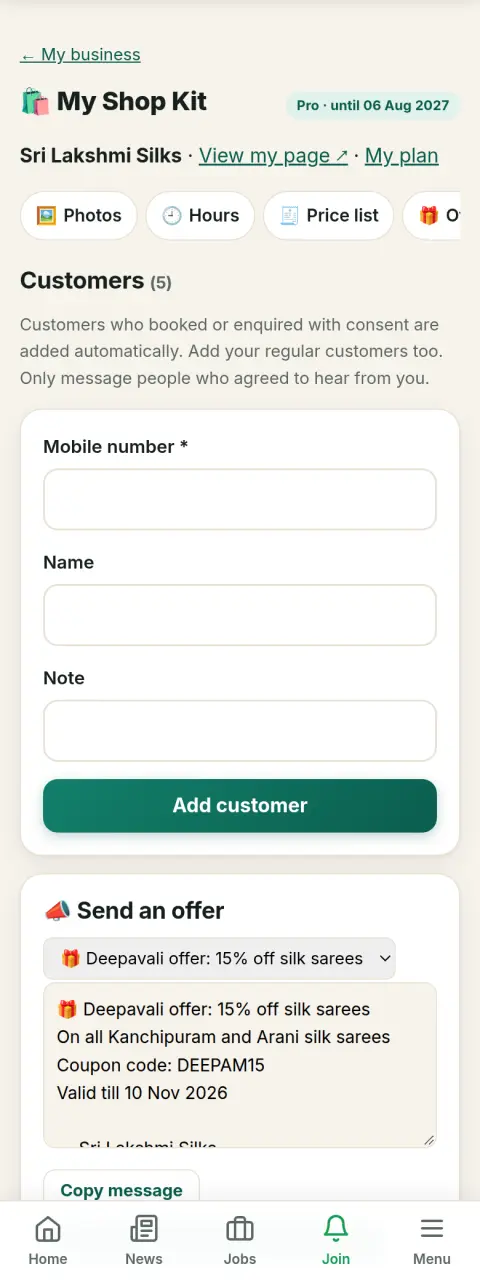
👥 Customer list & "send offer"

Included in: Pro

People who booked or enquired (and agreed) are saved automatically; add your regulars too. Send them an offer on WhatsApp in a tap, or download the list for Excel.

How to use

  1. Shop Kit tools → Customers → add mobile number and name.
  2. Pick a live offer; the message is ready. Tap 💬 next to a customer, or send it to your WhatsApp broadcast list.
  3. "Download as Excel (CSV)" keeps a copy.

💡 Message only people who agreed, and not too often — once or twice a month is plenty.

Customer list & "send offer" — screen in Shop Kit tools (sample shop)

🎨 WhatsApp status posters

Included in: Basic (3) · Pro (unlimited)

Ready designs (offer, we are open, review QR, festival greetings, new arrival, holiday notice, thank you) with your shop name, phone and page link. Download and post as your WhatsApp status or Instagram story.

How to use

  1. Shop Kit tools → Posters → choose a design.
  2. Change the headline, details, coupon code and colour; tick "Use my shop photo".
  3. Tap Download (or Share on a phone) and post it.

💡 Post a status two or three times a week; festival greetings are shared the most.

WhatsApp status posters — screen in Shop Kit tools (sample shop)

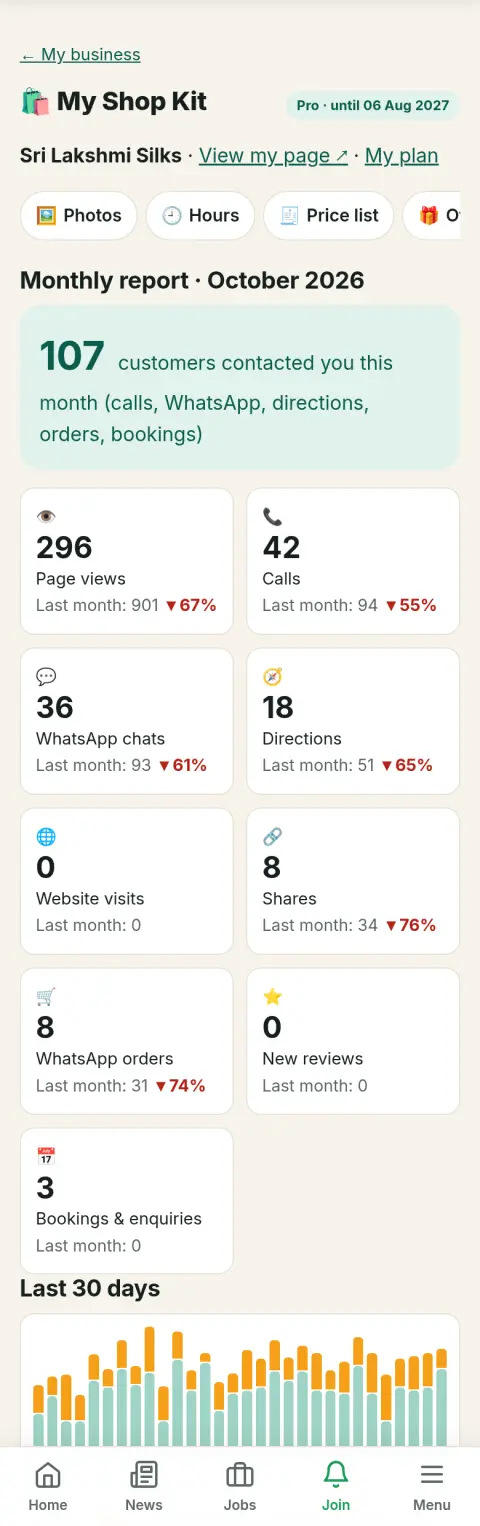
📈 Monthly report

Included in: Basic · Pro

See how many people viewed your page and tapped Call, WhatsApp, Directions, Website, Share or Order this month, compared with last month, plus a 30-day chart.

How to use

  1. Shop Kit tools → Report.
  2. The big number is customers who contacted you (calls, WhatsApp, directions, orders, bookings).
  3. Tap "Share summary" to send it to a partner on WhatsApp.

💡 After a new offer or poster, check whether calls and WhatsApp went up. Search engines are not counted.

Monthly report — screen in Shop Kit tools (sample shop)

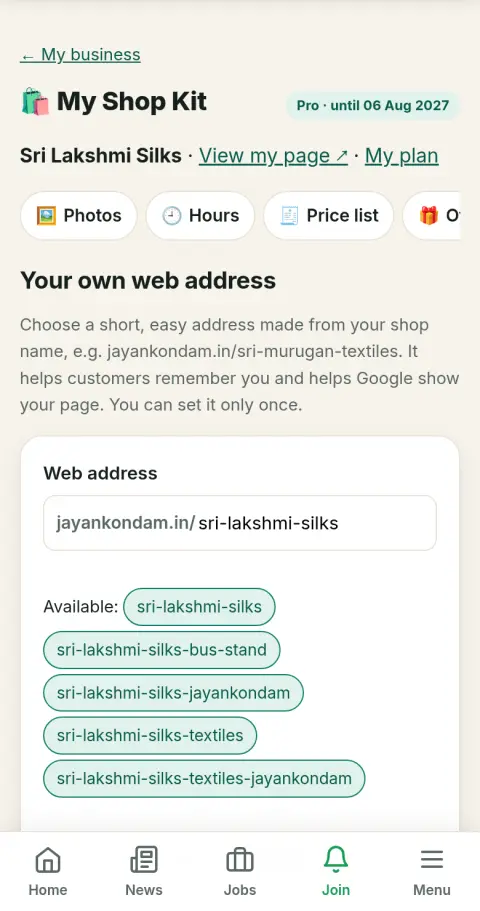
🔗 Your own web address

Included in: Pro

A short, memorable address for your page made from your shop name, like jayankondam.in/sri-murugan-textiles — easy to print on bills, cards and your shop board. Old links keep working and lead to it.

How to use

  1. Shop Kit tools → Web address.
  2. Tap a suggested address or type your own, then "Check availability".
  3. When it says available, tap "Use this address". It can be set only once.

💡 Use the name people say, add the area or town if the name is common, and check the spelling before you confirm. The address stays yours even if you stop the plan later.

Your own web address — screen in Shop Kit tools (sample shop)

Plan perks

🛍️Member badge

A "Basic member" / "Pro member" badge on your page builds trust.

Basic · Pro

🔝Higher in search

Your listing shows above free listings in search and category pages (after Featured ones).

Basic (3) · Pro (6)

⭐Featured days

Free days at the very top of your category with a ★ Featured badge, added when you buy the plan.

Pro (30)

🚫No ads on your page

No Google ads on your listing page, so visitors stay focused on your shop.

Basic · Pro

📢 Banner ads

Dashboard → Banner ads → Buy a banner. 1) Pick the place (home slideshow, header strip on every page, or inside business / news / bus / train / gold-rate pages). 2) Tick the towns — each town shows how many spots are free. 3) Pick 1, 3, 6 or 12 months. 4) Make your banner with the banner maker (it fills in your shop name and phone), upload your own at the size shown, or tick "Design it for me". 5) Pay by UPI or card. We check the banner and put it live, usually within a day; the months start on that day. Views and clicks show under My banners, with a Renew button.

Your town or every town · 1, 3, 6 or 12 months (up to 25% off for longer) · Upload your banner, make one on the site in a minute, or we design it free. See views and clicks in your dashboard.

Ready to start? Add your business free, then pick a plan from your dashboard.

Advertisement